> ## Documentation Index
> Fetch the complete documentation index at: https://docs.stagehand.dev/llms.txt
> Use this file to discover all available pages before exploring further.
# Evaluations & Metrics
> Monitor performance, optimize costs, and evaluate LLM effectiveness
export const V3Banner = () => null;
Evaluations help you understand how well your automation performs, which models work best for your use cases, and how to optimize for cost and reliability. This guide covers both monitoring your own workflows and running comprehensive evaluations.
## Why Evaluations Matter
* **Performance Optimization**: Identify which models and settings work best for your specific automation tasks
* **Cost Control**: Track token usage and inference time to optimize spending
* **Reliability**: Measure success rates and identify failure patterns
* **Model Selection**: Compare different LLMs on real-world tasks to make informed decisions
View real-time performance comparisons across different LLMs on the [Stagehand Evals Dashboard](https://www.stagehand.dev/evals)
## Comprehensive Evaluations
Evaluations help you systematically test and improve your automation workflows. Stagehand provides both built-in evaluations and tools to create your own.
### Evals CLI
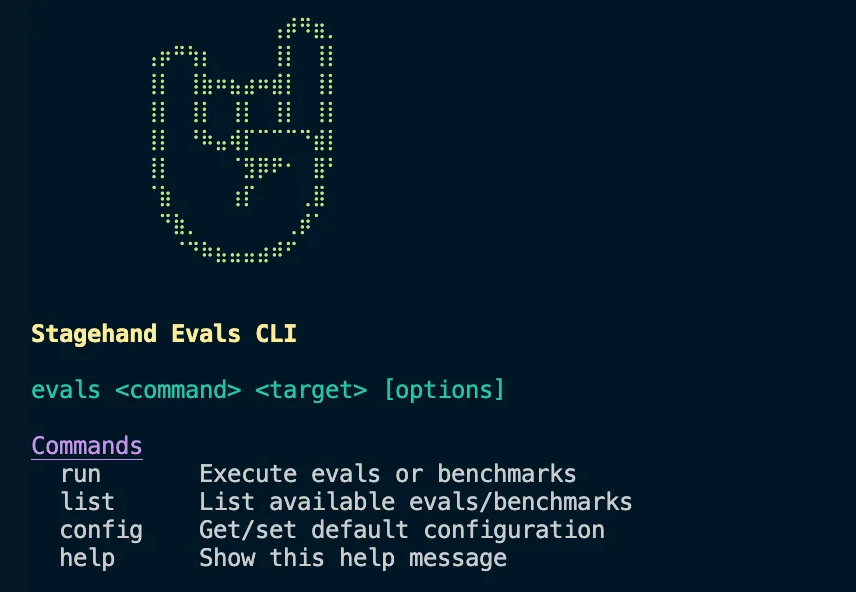 To run evals, you'll need to clone the [Stagehand repo](https://github.com/browserbase/stagehand) and set up the CLI.
We recommend using [Braintrust](https://www.braintrust.dev/docs/) to help visualize evals results and metrics.
The Stagehand CLI provides a powerful interface for running evaluations. You can run specific evals, categories, or external benchmarks with customizable settings.
Evals are grouped into:
1. **Act Evals** - These are evals that test the functionality of the `act` method.
2. **Extract Evals** - These are evals that test the functionality of the `extract` method.
3. **Observe Evals** - These are evals that test the functionality of the `observe` method.
4. **Combination Evals** - These are evals that test the functionality of the `act`, `extract`, and `observe` methods together.
5. **Experimental Evals** - These are experimental custom evals that test the functionality of the stagehand primitives.
6. **Agent Evals** - These are evals that test the functionality of `agent`.
7. **(NEW) External Benchmarks** - Run external benchmarks like WebBench, GAIA, WebVoyager, OnlineMind2Web, and OSWorld.
#### Installation
```bash theme={null}
# From the stagehand root directory
pnpm install
```
```bash theme={null}
pnpm run build:cli
```
```bash theme={null}
evals help
```
#### CLI Commands and Options
##### Basic Commands
```bash theme={null}
# Run all evals
evals run all
# Run specific category
evals run act
evals run extract
evals run observe
evals run agent
# Run specific eval
evals run extract/extract_text
# List available evals
evals list
evals list --detailed
# Configure defaults
evals config
evals config set env browserbase
evals config set trials 5
```
##### Command Options
* **`-e, --env`**: Environment (`local` or `browserbase`)
* **`-t, --trials`**: Number of trials per eval (default: 3)
* **`-c, --concurrency`**: Max parallel sessions (default: 10)
* **`-m, --model`**: Model override
* **`-p, --provider`**: Provider override
* **`--api`**: Use Stagehand API instead of SDK
##### Running External Benchmarks
The CLI supports several industry-standard benchmarks:
```bash theme={null}
# WebBench with filters
evals run benchmark:webbench -l 10 -f difficulty=easy -f category=READ
# GAIA benchmark
evals run b:gaia -s 100 -l 25 -f level=1
# WebVoyager
evals run b:webvoyager -l 50
# OnlineMind2Web
evals run b:onlineMind2Web
# OSWorld
evals run b:osworld -f source=Mind2Web
```
#### Configuration Files
You can view the specific evals in [`evals/tasks`](https://github.com/browserbase/stagehand/tree/main/packages/evals/tasks). Each eval is grouped into eval categories based on [`evals/evals.config.json`](https://github.com/browserbase/stagehand/blob/main/evals/evals.config.json).
#### Viewing eval results
To run evals, you'll need to clone the [Stagehand repo](https://github.com/browserbase/stagehand) and set up the CLI.
We recommend using [Braintrust](https://www.braintrust.dev/docs/) to help visualize evals results and metrics.
The Stagehand CLI provides a powerful interface for running evaluations. You can run specific evals, categories, or external benchmarks with customizable settings.
Evals are grouped into:
1. **Act Evals** - These are evals that test the functionality of the `act` method.
2. **Extract Evals** - These are evals that test the functionality of the `extract` method.
3. **Observe Evals** - These are evals that test the functionality of the `observe` method.
4. **Combination Evals** - These are evals that test the functionality of the `act`, `extract`, and `observe` methods together.
5. **Experimental Evals** - These are experimental custom evals that test the functionality of the stagehand primitives.
6. **Agent Evals** - These are evals that test the functionality of `agent`.
7. **(NEW) External Benchmarks** - Run external benchmarks like WebBench, GAIA, WebVoyager, OnlineMind2Web, and OSWorld.
#### Installation
```bash theme={null}
# From the stagehand root directory
pnpm install
```
```bash theme={null}
pnpm run build:cli
```
```bash theme={null}
evals help
```
#### CLI Commands and Options
##### Basic Commands
```bash theme={null}
# Run all evals
evals run all
# Run specific category
evals run act
evals run extract
evals run observe
evals run agent
# Run specific eval
evals run extract/extract_text
# List available evals
evals list
evals list --detailed
# Configure defaults
evals config
evals config set env browserbase
evals config set trials 5
```
##### Command Options
* **`-e, --env`**: Environment (`local` or `browserbase`)
* **`-t, --trials`**: Number of trials per eval (default: 3)
* **`-c, --concurrency`**: Max parallel sessions (default: 10)
* **`-m, --model`**: Model override
* **`-p, --provider`**: Provider override
* **`--api`**: Use Stagehand API instead of SDK
##### Running External Benchmarks
The CLI supports several industry-standard benchmarks:
```bash theme={null}
# WebBench with filters
evals run benchmark:webbench -l 10 -f difficulty=easy -f category=READ
# GAIA benchmark
evals run b:gaia -s 100 -l 25 -f level=1
# WebVoyager
evals run b:webvoyager -l 50
# OnlineMind2Web
evals run b:onlineMind2Web
# OSWorld
evals run b:osworld -f source=Mind2Web
```
#### Configuration Files
You can view the specific evals in [`evals/tasks`](https://github.com/browserbase/stagehand/tree/main/packages/evals/tasks). Each eval is grouped into eval categories based on [`evals/evals.config.json`](https://github.com/browserbase/stagehand/blob/main/evals/evals.config.json).
#### Viewing eval results
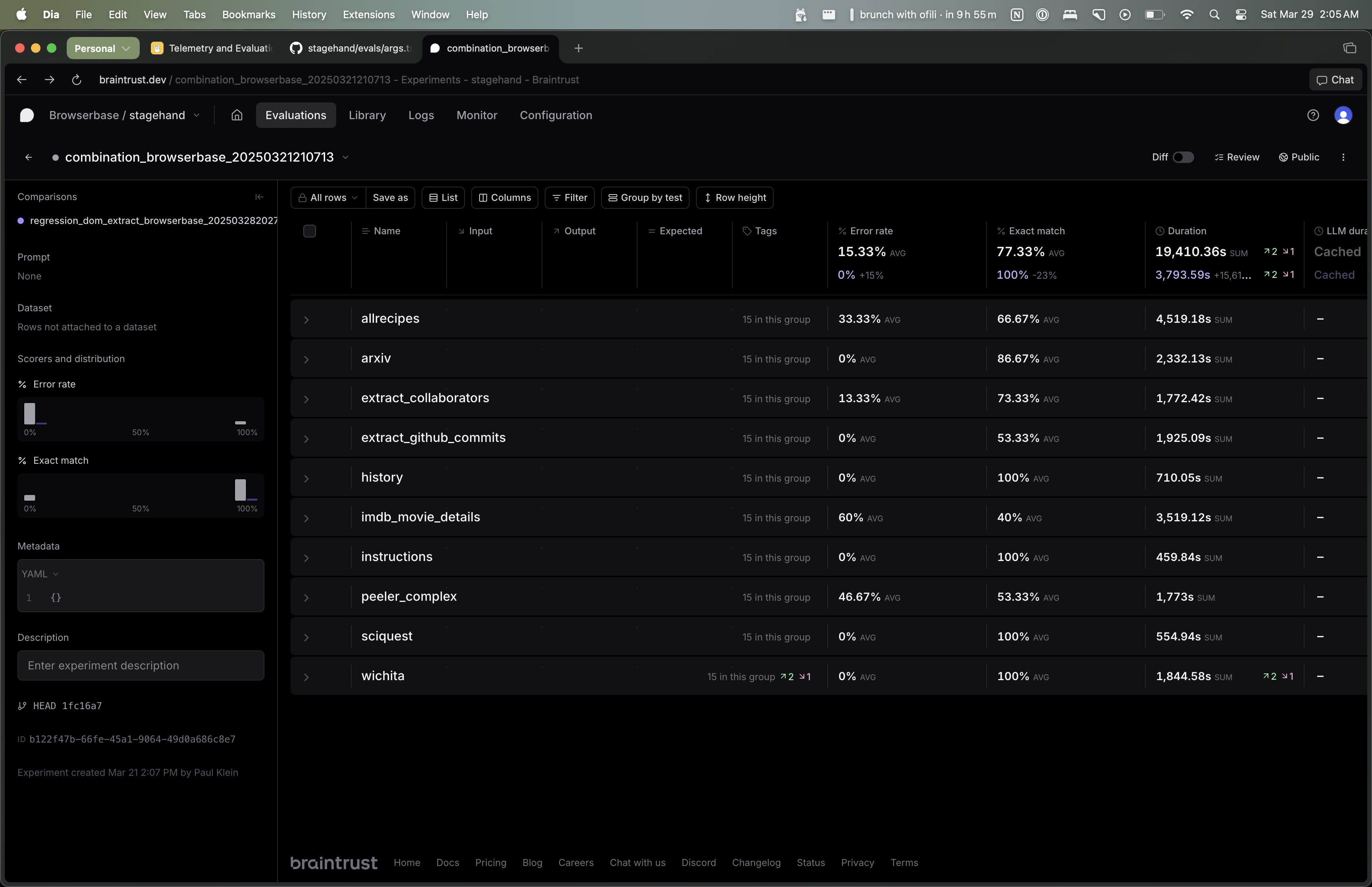 Eval results are viewable on Braintrust. You can view the results of a specific eval by going to the Braintrust URL specified in the terminal when you run `npm run evals`.
By default, each eval will run five times per model. The "Exact Match" column shows the percentage of times the eval was correct. The "Error Rate" column shows the percentage of times the eval errored out.
You can use the Braintrust UI to filter by model/eval and aggregate results across all evals.
## Creating Custom Evaluations
### Step-by-Step Guide
Create a new file in `evals/tasks/your-eval.ts`:
```typescript theme={null}
import { EvalTask } from '../types';
export const customEvalTask: EvalTask = {
name: 'custom_task_name',
description: 'Test specific automation workflow',
// Test setup
setup: async ({ page }) => {
await page.goto('https://example.com');
},
// The actual test
task: async ({ stagehand, page }) => {
// Your automation logic
await stagehand.act({ action: 'click the login button' });
const result = await stagehand.extract({
instruction: 'Get the user name',
schema: { username: 'string' }
});
return result;
},
// Validation
validate: (result, expected) => {
return result.username === expected.username;
},
// Test cases
testCases: [
{
input: { /* test input */ },
expected: { username: 'john_doe' }
}
],
// Evaluation criteria
scoring: {
exactMatch: true,
timeout: 30000,
retries: 2
}
};
```
Update `evals/evals.config.json`:
```json theme={null}
{
"categories": {
"custom": ["custom_task_name"],
"existing_category": ["custom_task_name"]
}
}
```
```bash theme={null}
# Test your custom evaluation
evals run custom_task_name
# Run the entire custom category
evals run custom
# Run with specific settings
evals run custom_task_name -e browserbase -t 5 -m gpt-4o
```
## Best Practices for Custom Evals
* **Atomic**: Each test should validate one specific capability
* **Deterministic**: Tests should produce consistent, measurable results
* **Realistic**: Use real-world scenarios and websites
* **Measurable**: Define clear success/failure criteria
* **Parallel Execution**: Design tests to run independently
* **Resource Management**: Clean up after each test
* **Timeout Handling**: Set appropriate timeouts for operations
* **Error Recovery**: Handle failures gracefully
* **Ground Truth**: Establish reliable expected outcomes
* **Edge Cases**: Test boundary conditions and error scenarios
* **Statistical Significance**: Run multiple iterations for reliability
* **Version Control**: Track changes to test cases over time
### Troubleshooting Evaluations
**Symptoms**: Tests fail with timeout errors
**Solutions**:
* Increase timeout in `taskConfig.ts`
* Use faster models (Gemini 2.5 Flash, Claude Haiku 4.5)
* Optimize test scenarios to be less complex
* Check network connectivity to LLM providers
**Symptoms**: Same test passes/fails randomly
**Solutions**:
* Set temperature to 0 for deterministic outputs
* Increase repetitions for statistical significance
* Use more capable models for complex tasks
* Check for dynamic website content affecting tests
**Symptoms**: Token usage exceeding budget
**Solutions**:
* Use cost-effective models (Gemini 2.5 Flash, Claude Haiku 4.5)
* Reduce repetitions for initial testing
* Focus on specific evaluation categories
* Use local browser environment to reduce Browserbase costs
**Symptoms**: Results not uploading to dashboard
**Solutions**:
* Check Braintrust API key configuration
* Verify internet connectivity
* Update Braintrust SDK to latest version
* Check project permissions in Braintrust dashboard
Eval results are viewable on Braintrust. You can view the results of a specific eval by going to the Braintrust URL specified in the terminal when you run `npm run evals`.
By default, each eval will run five times per model. The "Exact Match" column shows the percentage of times the eval was correct. The "Error Rate" column shows the percentage of times the eval errored out.
You can use the Braintrust UI to filter by model/eval and aggregate results across all evals.
## Creating Custom Evaluations
### Step-by-Step Guide
Create a new file in `evals/tasks/your-eval.ts`:
```typescript theme={null}
import { EvalTask } from '../types';
export const customEvalTask: EvalTask = {
name: 'custom_task_name',
description: 'Test specific automation workflow',
// Test setup
setup: async ({ page }) => {
await page.goto('https://example.com');
},
// The actual test
task: async ({ stagehand, page }) => {
// Your automation logic
await stagehand.act({ action: 'click the login button' });
const result = await stagehand.extract({
instruction: 'Get the user name',
schema: { username: 'string' }
});
return result;
},
// Validation
validate: (result, expected) => {
return result.username === expected.username;
},
// Test cases
testCases: [
{
input: { /* test input */ },
expected: { username: 'john_doe' }
}
],
// Evaluation criteria
scoring: {
exactMatch: true,
timeout: 30000,
retries: 2
}
};
```
Update `evals/evals.config.json`:
```json theme={null}
{
"categories": {
"custom": ["custom_task_name"],
"existing_category": ["custom_task_name"]
}
}
```
```bash theme={null}
# Test your custom evaluation
evals run custom_task_name
# Run the entire custom category
evals run custom
# Run with specific settings
evals run custom_task_name -e browserbase -t 5 -m gpt-4o
```
## Best Practices for Custom Evals
* **Atomic**: Each test should validate one specific capability
* **Deterministic**: Tests should produce consistent, measurable results
* **Realistic**: Use real-world scenarios and websites
* **Measurable**: Define clear success/failure criteria
* **Parallel Execution**: Design tests to run independently
* **Resource Management**: Clean up after each test
* **Timeout Handling**: Set appropriate timeouts for operations
* **Error Recovery**: Handle failures gracefully
* **Ground Truth**: Establish reliable expected outcomes
* **Edge Cases**: Test boundary conditions and error scenarios
* **Statistical Significance**: Run multiple iterations for reliability
* **Version Control**: Track changes to test cases over time
### Troubleshooting Evaluations
**Symptoms**: Tests fail with timeout errors
**Solutions**:
* Increase timeout in `taskConfig.ts`
* Use faster models (Gemini 2.5 Flash, Claude Haiku 4.5)
* Optimize test scenarios to be less complex
* Check network connectivity to LLM providers
**Symptoms**: Same test passes/fails randomly
**Solutions**:
* Set temperature to 0 for deterministic outputs
* Increase repetitions for statistical significance
* Use more capable models for complex tasks
* Check for dynamic website content affecting tests
**Symptoms**: Token usage exceeding budget
**Solutions**:
* Use cost-effective models (Gemini 2.5 Flash, Claude Haiku 4.5)
* Reduce repetitions for initial testing
* Focus on specific evaluation categories
* Use local browser environment to reduce Browserbase costs
**Symptoms**: Results not uploading to dashboard
**Solutions**:
* Check Braintrust API key configuration
* Verify internet connectivity
* Update Braintrust SDK to latest version
* Check project permissions in Braintrust dashboard